Smart Collection Pro
This documentation will guide you through setting up and using Smart Collection Pro to enhance your Shopify collections with advanced conditions, hierarchy, and auto-syncing.
What is Smart Collection Pro?
Smart Collection Pro is a Shopify app that enhances the way you manage collections on Shopify, with advanced conditions and a real hierarchy between them, so your collections stay accurate on their own as your catalog changes.
The challenge: Shopify's smart collections can check a tag, a price, or a vendor, but they stop there. They can't tell you a product is on sale or that it was published in the last few days, and what they offer for relating collections to each other is narrow: no nested AND/OR logic, so it holds up for the simplest cases and breaks down past that. So stores patch the real gaps by hand, tagging products for sales that come and go, copying the same rules across collections that should really be related, manually keeping a "Beachwear" collection as the sensible slice of "Summer Sale" it's supposed to be. It works, until the moment it doesn't, and the more collections you build, the more there is to keep straight.
The solution: hierarchy. You organize collections as a tree, and a child collection is always a subset of its parent, whichever inheritance mode you use. Set a rule once on a parent, say "on sale," and every collection beneath it only has to worry about its own slice of that already-filtered set, instead of checking the entire catalog again. That same structure carries over to your storefront through theme integrations like breadcrumbs and the collection grid, so the organization you build in the app is also what your customers see when they browse.
Key Features
- Advanced filtering with nested AND/OR groups, including rolling dates, inventory and sellable quantity, automatic discount detection, and the ability to reference other collections, for collections that always stay up to date on their own.
- Nested hierarchy with flexible inheritance: mix and match narrow down (a child filters further into its parent's products) and roll up (a collection pulls in everything from its sub-collections) across the same tree.
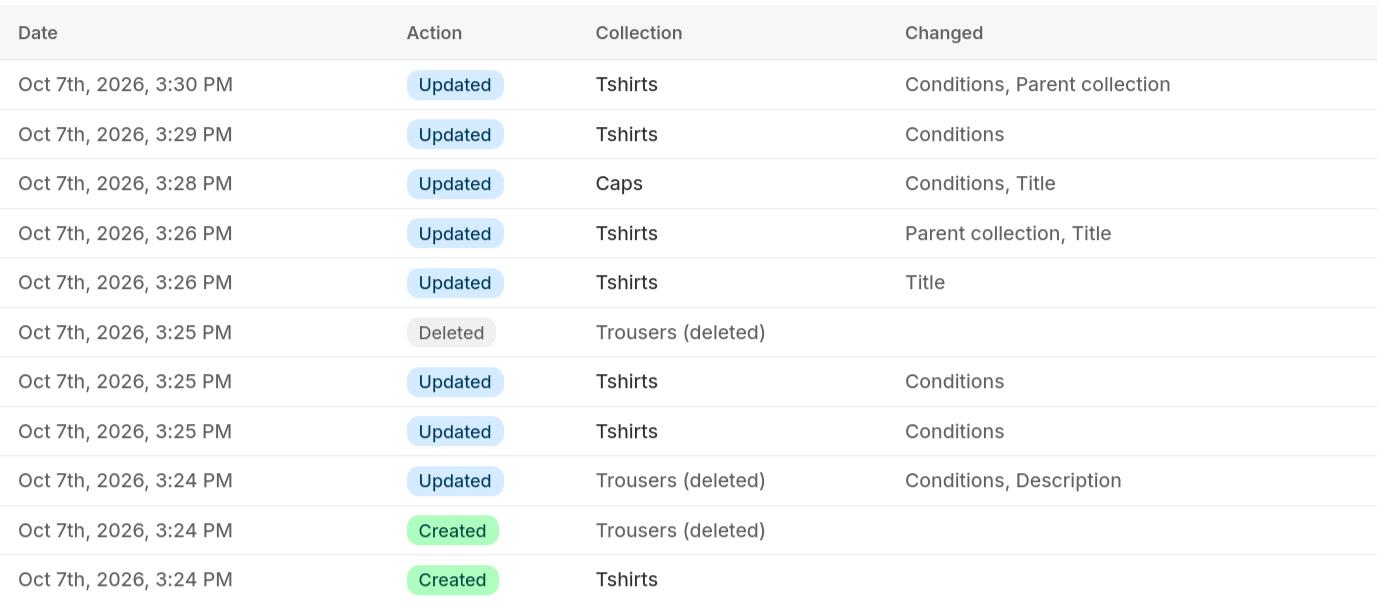
- Activity Log to track what the app changed, and which products it moved, and when.
- Theme integration, with a breadcrumb and a collection grid that both follow your hierarchy automatically, for easier store navigation.
- Built for scale, with sync performance that holds up on catalogs of any size.
Advanced filtering
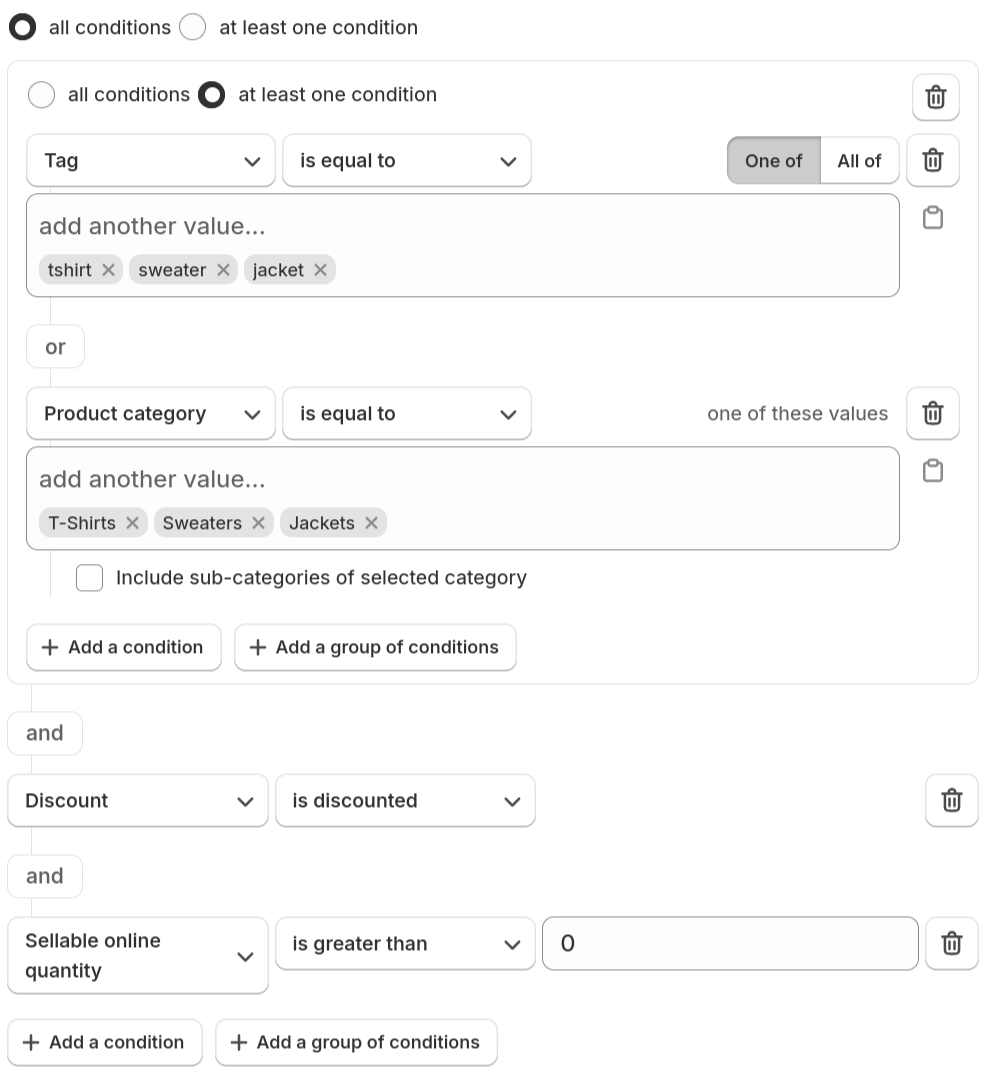
Smart Collection Pro lets you automate collections with advanced conditions. You can mix and match blocks of filters, nested into AND/OR groups, to fit any situation: narrowing down by multiple product attributes, excluding certain items, or combining rules for more flexibility.
Beyond basics like title, tags, or price, conditions cover things like rolling date windows (precise to the hour) for fields like "published in the last 2 days," inventory and sellable-online quantity, automatic discount detection based on compare-at price, and whether a product does or doesn't belong to another one of your collections.
For example, create a collection for all products that are on sale and have more than 10 units in stock, or include products that are either in a "Clearance" collection or have a specific tag, but exclude those from a particular brand.
Nested Hierarchy
With Smart Collection Pro, you can nest collections to create a hierarchical structure where every child is guaranteed to be a subset of its parent. You choose how each collection relates to its parent, and you can mix both modes freely across the same tree:
- Narrow down: the child inherits its parent's products and applies additional filters on top, rather than filtering the entire catalog. For example, a parent collection like "Summer Sale" can include all products on sale, and a child collection like "Beachwear" can narrow that down further by product type or tags.
- Roll up: a collection pulls in the combined products of its sub-collections automatically, instead of you repeating the same filters on each one. For example, a "Women's Clothing" collection can roll up everything from its "Dresses" and "T-Shirts" sub-collections.
This keeps your collections organized and consistent as your catalog grows, while cutting down on repeated setup. You can also group collections under folders without creating extra Shopify collections. See how to set up nesting.

Theme Integration

Your hierarchy doesn't just stay inside the app: two theme app blocks bring it to your storefront automatically.
Breadcrumb reflects the parent-child relationships you've set up, so customers always see where they are. For example, Home > Summer Sale > Beachwear.
Collection Grid shows sub-collections as a grid of cards: on a collection page it shows that collection's children, and elsewhere (like your homepage) it shows your root-level collections, so customers can drill further down into your hierarchy.
Both are simple to set up and stay in sync with your collections as your hierarchy changes.
Activity Log
Since Smart Collection Pro is making changes to your collections on your behalf, the Activity Log keeps a record of what it did: changes to a collection itself (like its conditions, parent, or inheritance mode) and every product it moved in or out. It's the first place to look whenever a collection looks different than you expected. See the full Activity Log documentation.